概述
Nginx作为高性能Web服务器,其优化配置对于提升网站性能和安全性至关重要。本指南将详细介绍Nginx优化的核心配置方法,帮助您构建安全、高效的Web服务环境。
隐藏版本信息
隐藏Nginx版本信息是提升服务器安全性的重要措施,可以防止攻击者获取服务器版本信息,降低被针对性攻击的风险。
安全风险分析
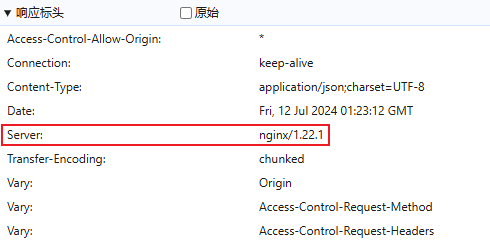
没有隐藏版本号前可以看到使用的是哪种 web 服务以及版本号,这可能暴露服务器信息给潜在攻击者。
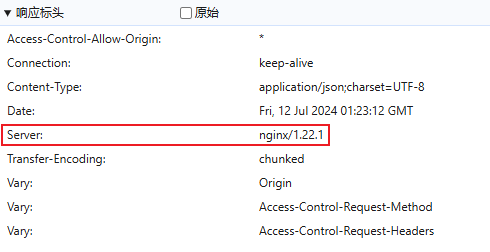 (`图1`)
配置优化方案
方案一:修改配置文件
在Nginx配置文件的HTTP块中添加 server_tokens off; 指令:
 1
 2
 3
 4
 5
 6
 7
 8
 9
10
11
12
13
14
|
http {
    include       mime.types;
    default_type  application/octet-stream;

    # 关闭版本号显示,只显示服务类型不显示版本号
    server_tokens off;

    # 其他优化配置...
    sendfile on;
    tcp_nopush on;
    tcp_nodelay on;
    keepalive_timeout 65;
    types_hash_max_size 2048;
}
|
方案二:修改源码并编译
对于需要完全自定义服务标识的场景,可以通过修改源码实现:
 1
 2
 3
 4
 5
 6
 7
 8
 9
10
11
12
13
14
15
16
17
|
# 编辑源码文件
vim /usr/local/lib64/nginx-1.15.9/src/core/nginx.h

# nginx.h文件第13、14行修改为:
#define NGINX_VERSION      "custom_version"         # 自定义版本号
#define NGINX_VER          "MyWebServer/" NGINX_VERSION # 自定义服务名称

# 配置编译选项
./configure --prefix=/usr/local/nginx \
    --with-http_ssl_module \
    --with-http_realip_module \
    --with-http_gzip_static_module \
    --with-http_secure_link_module \
    --with-http_stub_status_module

# 编译安装
make && make install
|
配置验证
修改完成后,重新加载Nginx配置:
1
2
3
4
5
6
7
8
|
# 测试配置语法
nginx -t

# 重新加载配置
nginx -s reload

# 查看响应头确认版本信息已隐藏
curl -I http://your-domain.com
|
性能优化配置
HTTP优化设置
 1
 2
 3
 4
 5
 6
 7
 8
 9
10
11
12
13
14
15
16
17
18
19
20
21
22
23
24
25
26
27
28
|
http {
    # 基础优化
    sendfile on;
    tcp_nopush on;
    tcp_nodelay on;
    keepalive_timeout 65;
    keepalive_requests 100;

    # 缓冲区优化
    client_body_buffer_size 128k;
    client_max_body_size 10m;
    client_header_buffer_size 1k;
    large_client_header_buffers 4 4k;
    output_buffers 1 32k;
    postpone_output 1460;

    # 超时设置
    client_header_timeout 3m;
    client_body_timeout 3m;
    send_timeout 3m;

    # Gzip压缩
    gzip on;
    gzip_min_length 1k;
    gzip_buffers 4 16k;
    gzip_comp_level 6;
    gzip_types text/plain application/x-javascript text/css application/xml application/javascript;
}
|
安全加固建议
限制访问方法
 1
 2
 3
 4
 5
 6
 7
 8
 9
10
11
12
13
14
15
16
|
# 禁用不必要的HTTP方法
if ($request_method !~ ^(GET|HEAD|POST)$ ) {
    return 444;
}

# 隐藏服务器标识
server_tokens off;

# 防止点击劫持
add_header X-Frame-Options "SAMEORIGIN" always;

# 防止MIME类型嗅探
add_header X-Content-Type-Options "nosniff" always;

# XSS保护
add_header X-XSS-Protection "1; mode=block" always;
|