管理和阅读书籍

注意
本文最后更新于 2025-09-08,文中内容可能已过时。

Calibre客户端使用指南

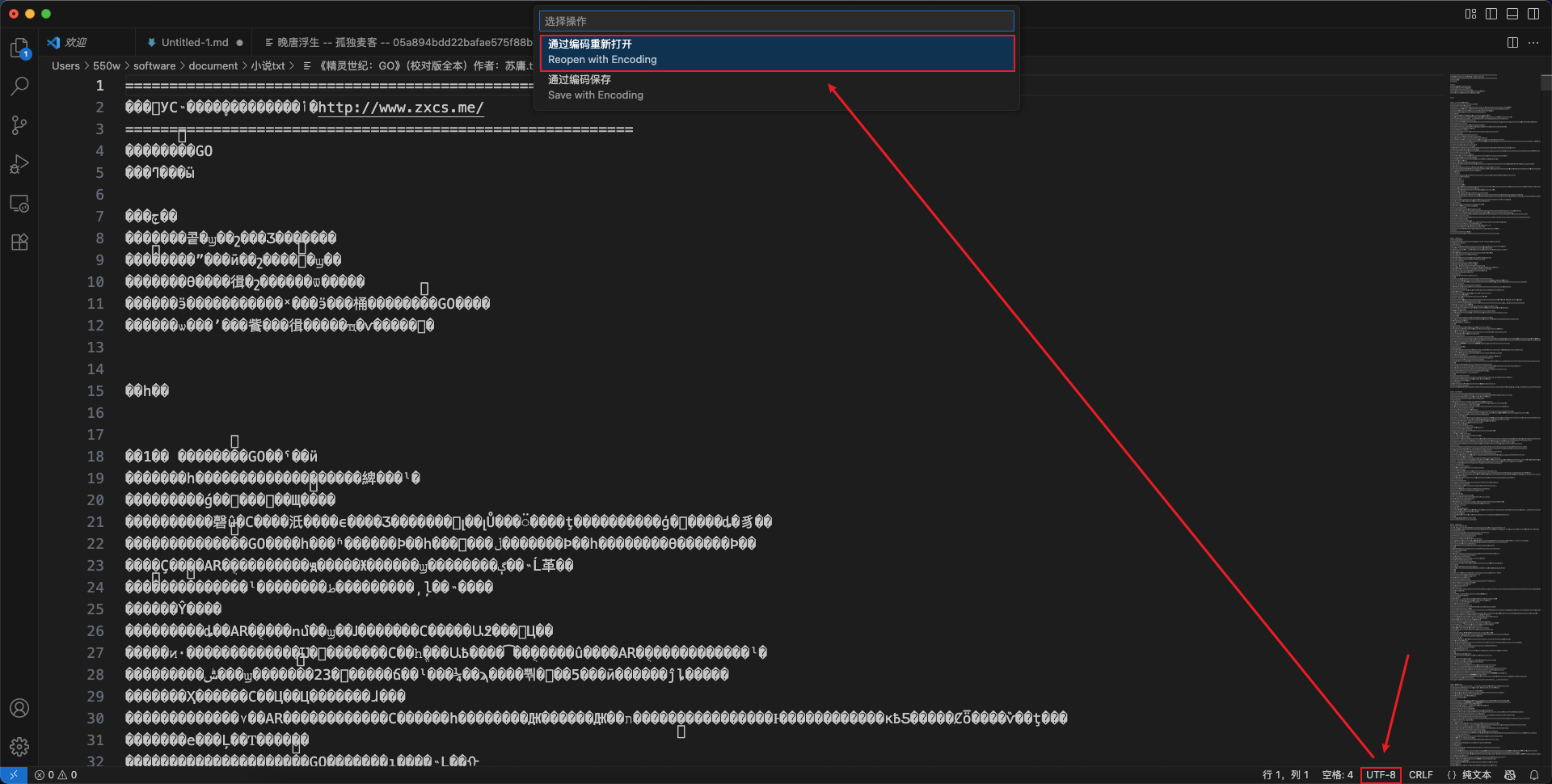
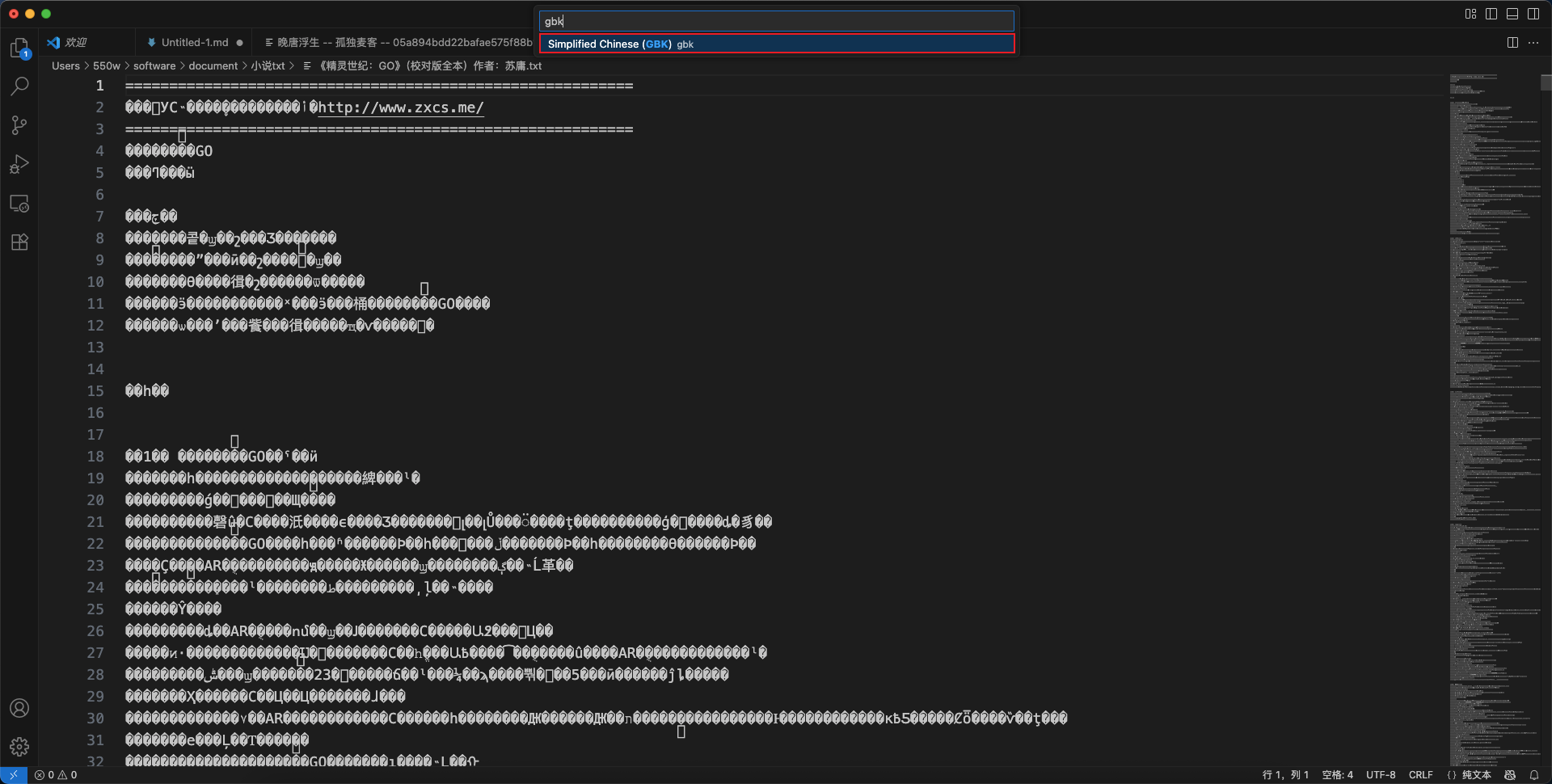
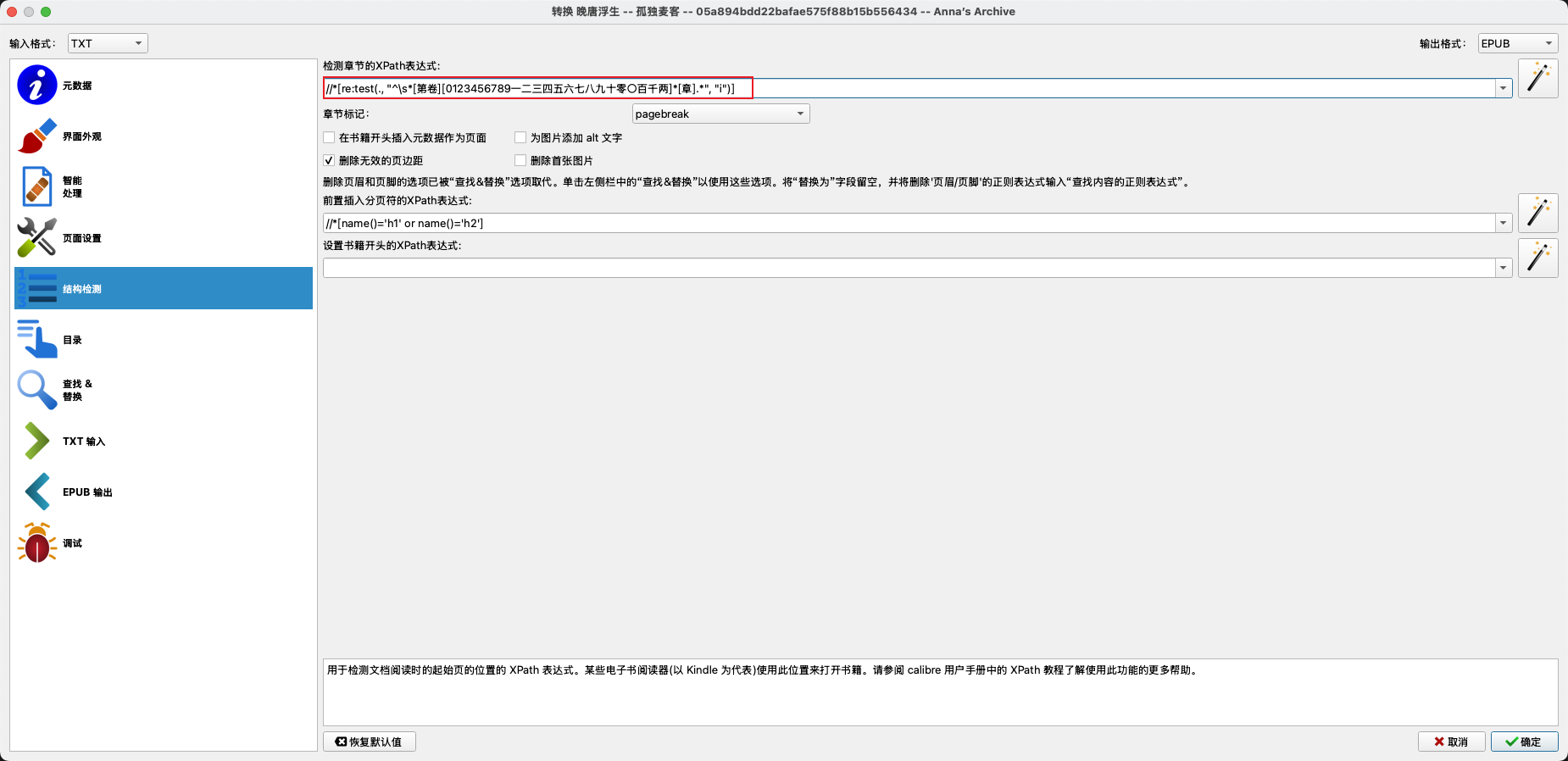
txt文件乱码

/images/guides/管理和阅读书籍/1.png
(图1)
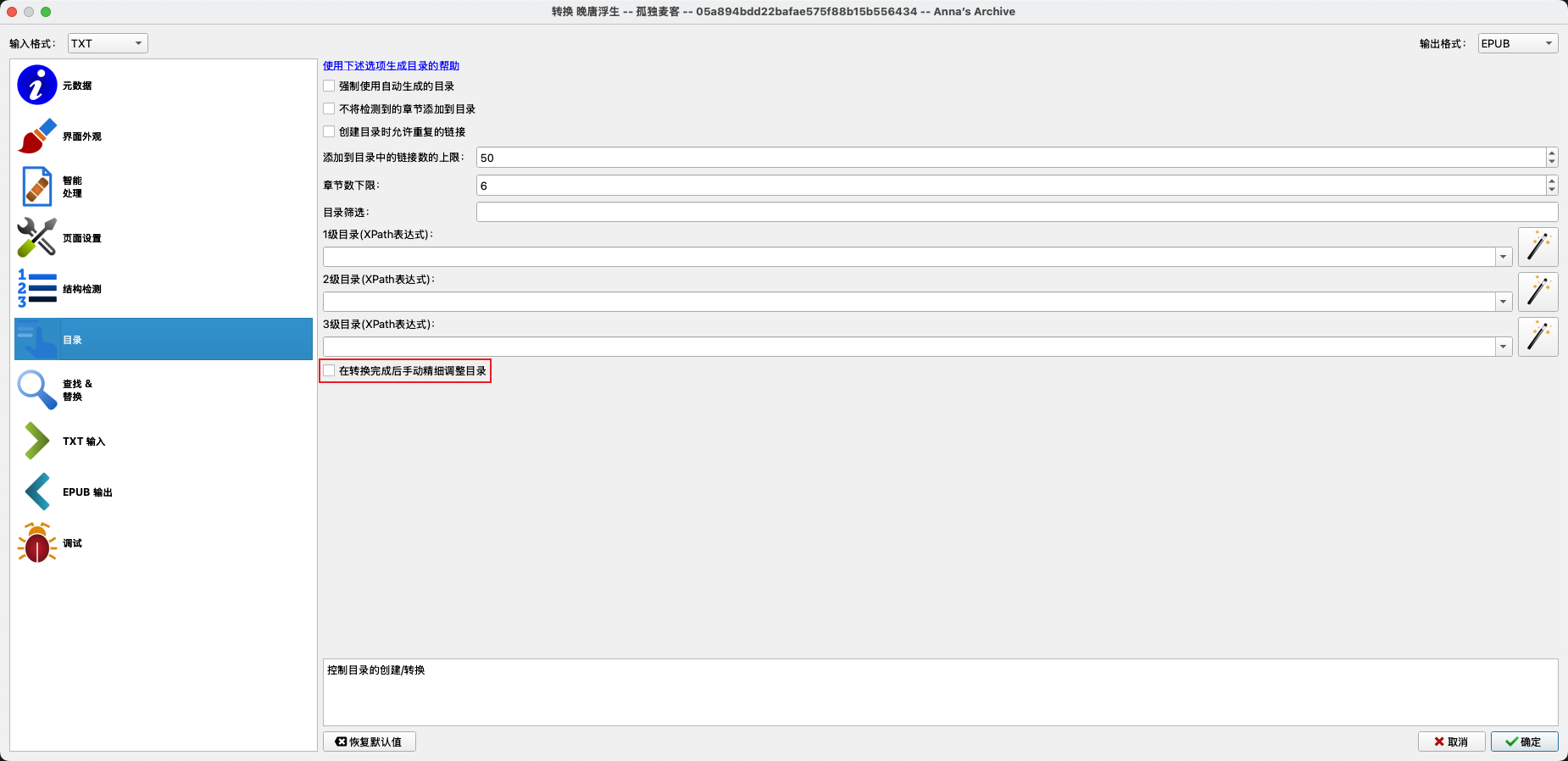
/images/guides/管理和阅读书籍/2.png
(图2)

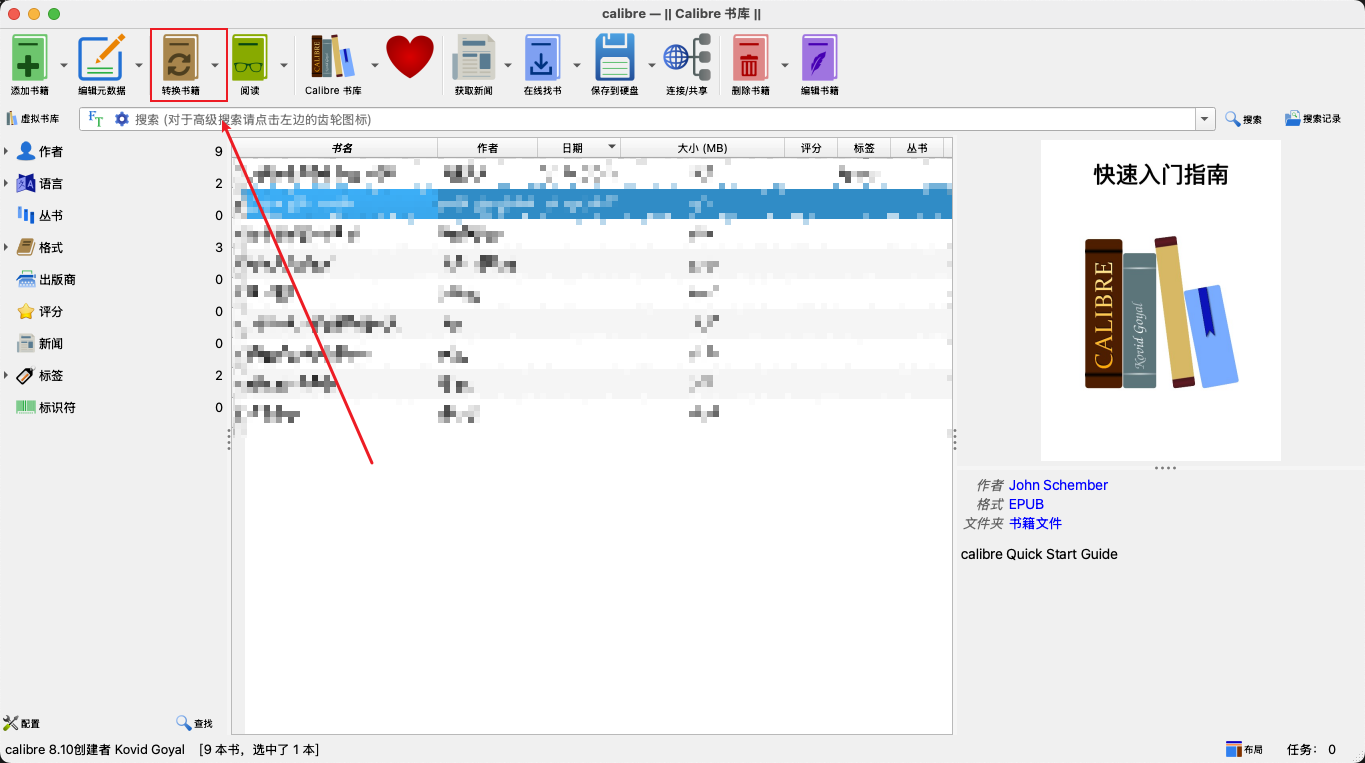
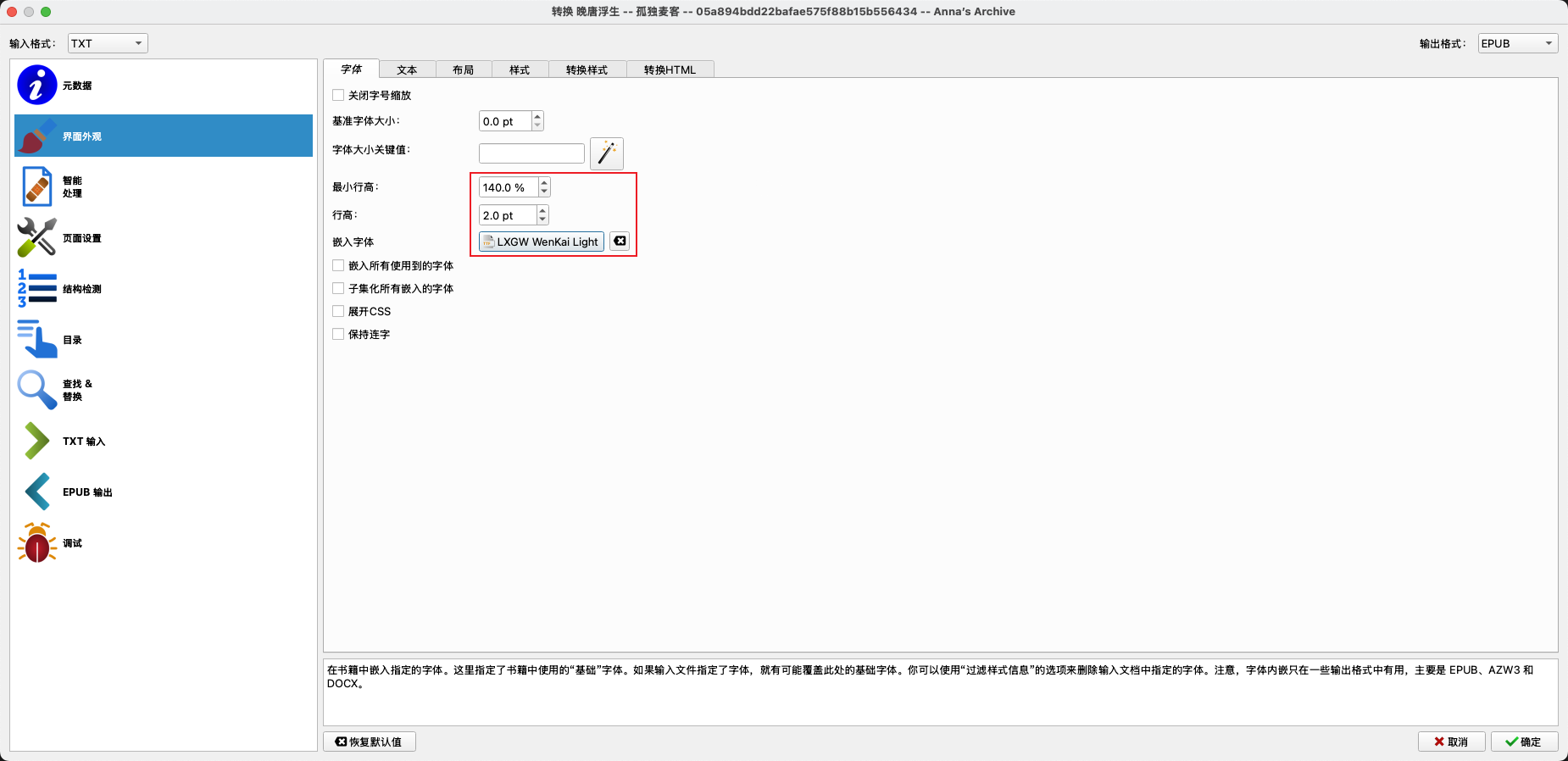
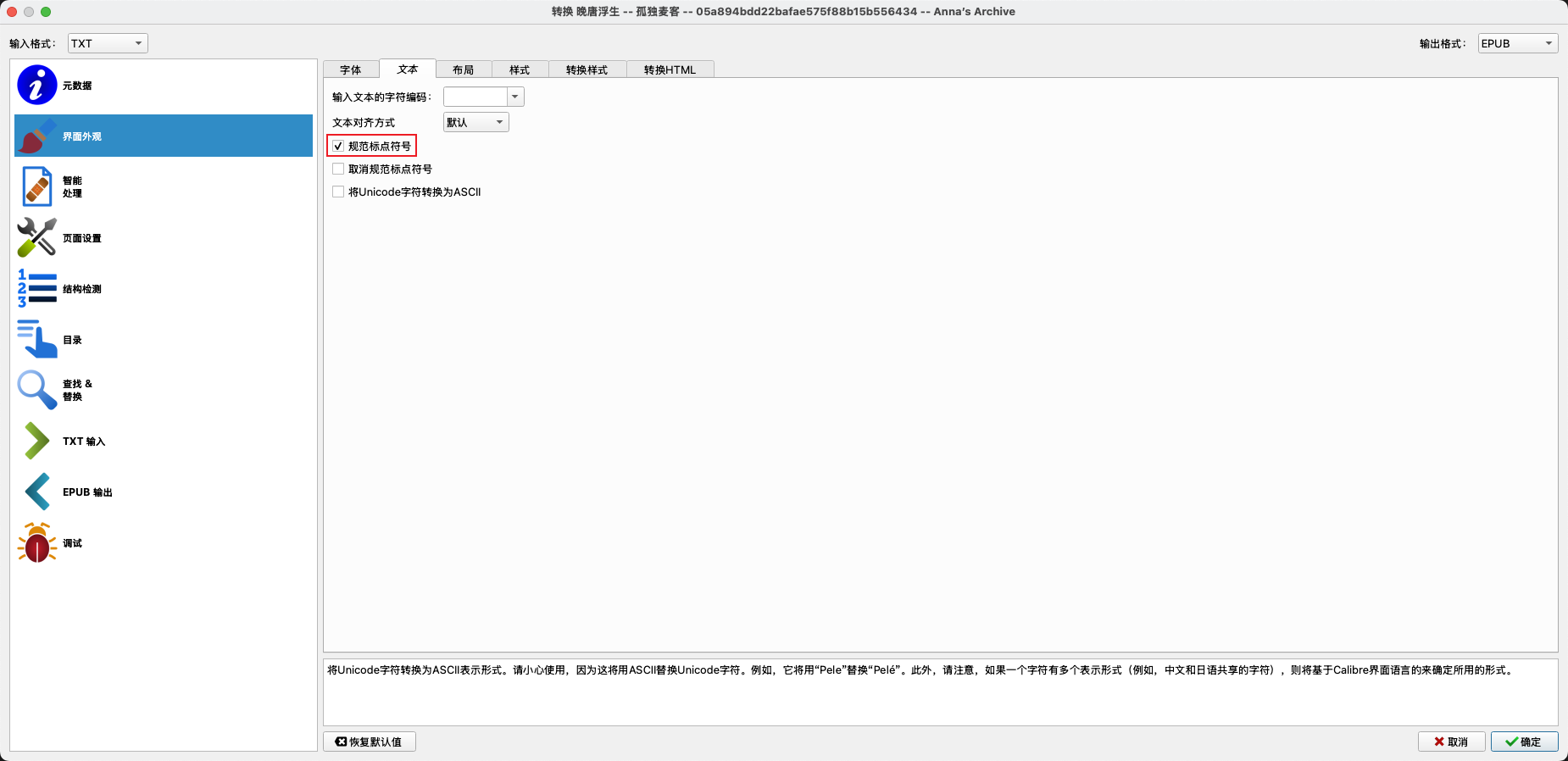
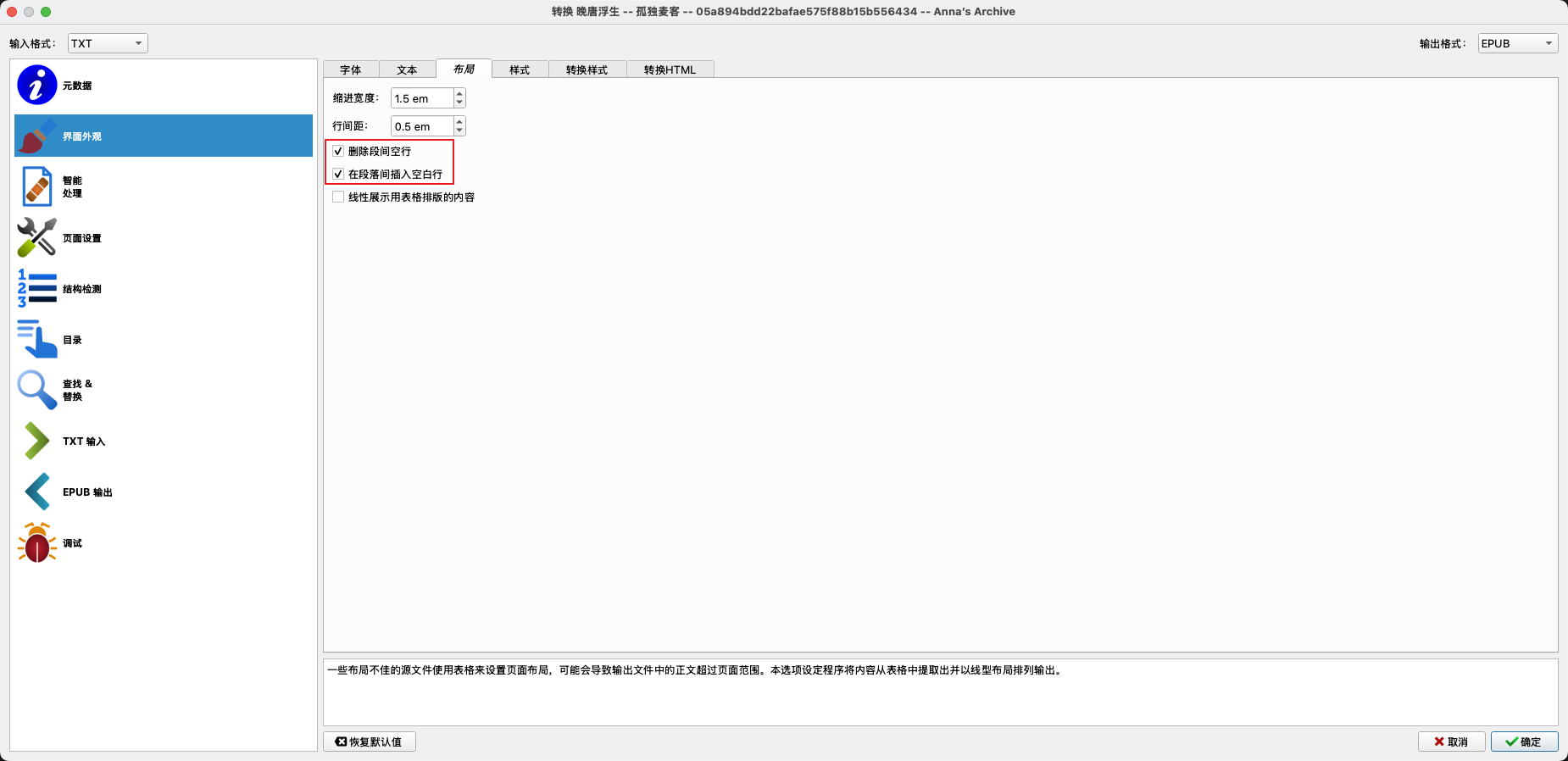
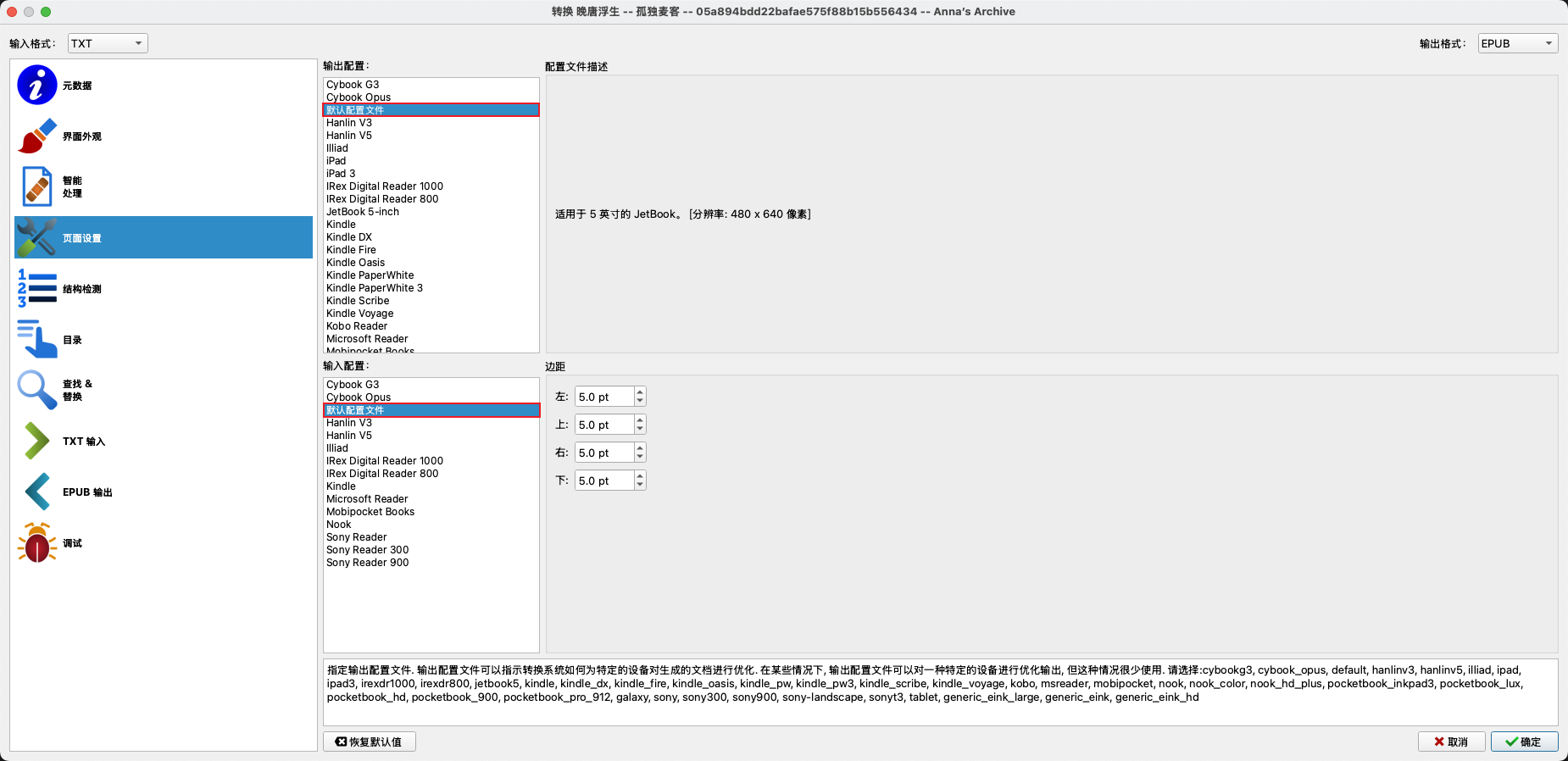
转换书籍

/images/guides/管理和阅读书籍/3.png
(图3)
/images/guides/管理和阅读书籍/4.png
(图4)
/images/guides/管理和阅读书籍/5.png
(图5)
/images/guides/管理和阅读书籍/6.png
(图6)
/images/guides/管理和阅读书籍/7.png
(图7)
/images/guides/管理和阅读书籍/8.png
(图8)
/images/guides/管理和阅读书籍/9.png
(图9)
/images/guides/管理和阅读书籍/10.png
(图10)

  1
  2
  3
  4
  5
  6
  7
  8
  9
 10
 11
 12
 13
 14
 15
 16
 17
 18
 19
 20
 21
 22
 23
 24
 25
 26
 27
 28
 29
 30
 31
 32
 33
 34
 35
 36
 37
 38
 39
 40
 41
 42
 43
 44
 45
 46
 47
 48
 49
 50
 51
 52
 53
 54
 55
 56
 57
 58
 59
 60
 61
 62
 63
 64
 65
 66
 67
 68
 69
 70
 71
 72
 73
 74
 75
 76
 77
 78
 79
 80
 81
 82
 83
 84
 85
 86
 87
 88
 89
 90
 91
 92
 93
 94
 95
 96
 97
 98
 99
100
101
102
103
104
105
106
107
108
109
110
111
112
113
114
115
116
117
118
119
120
121
122
123
124
125
126
127
128
129
130
131
132
133
134
135
136
137
138
139
140
141
142
143
144
145
146
147
148
149
150
151
152
153
154
155
156
157
158
159
160
161
162
163
164
165
166
167
168
169
170
171
172
173
174
175
176
177
178
179
180
181
182
183
184
185
186
187
188
189
190
191
192
193
194
195
196
197
198
199
200
201
202
203
204
205
206
207
208
209
210
211
212
213
214
215
216
217
218
219
220
221
222
223
224
225
226
227
228
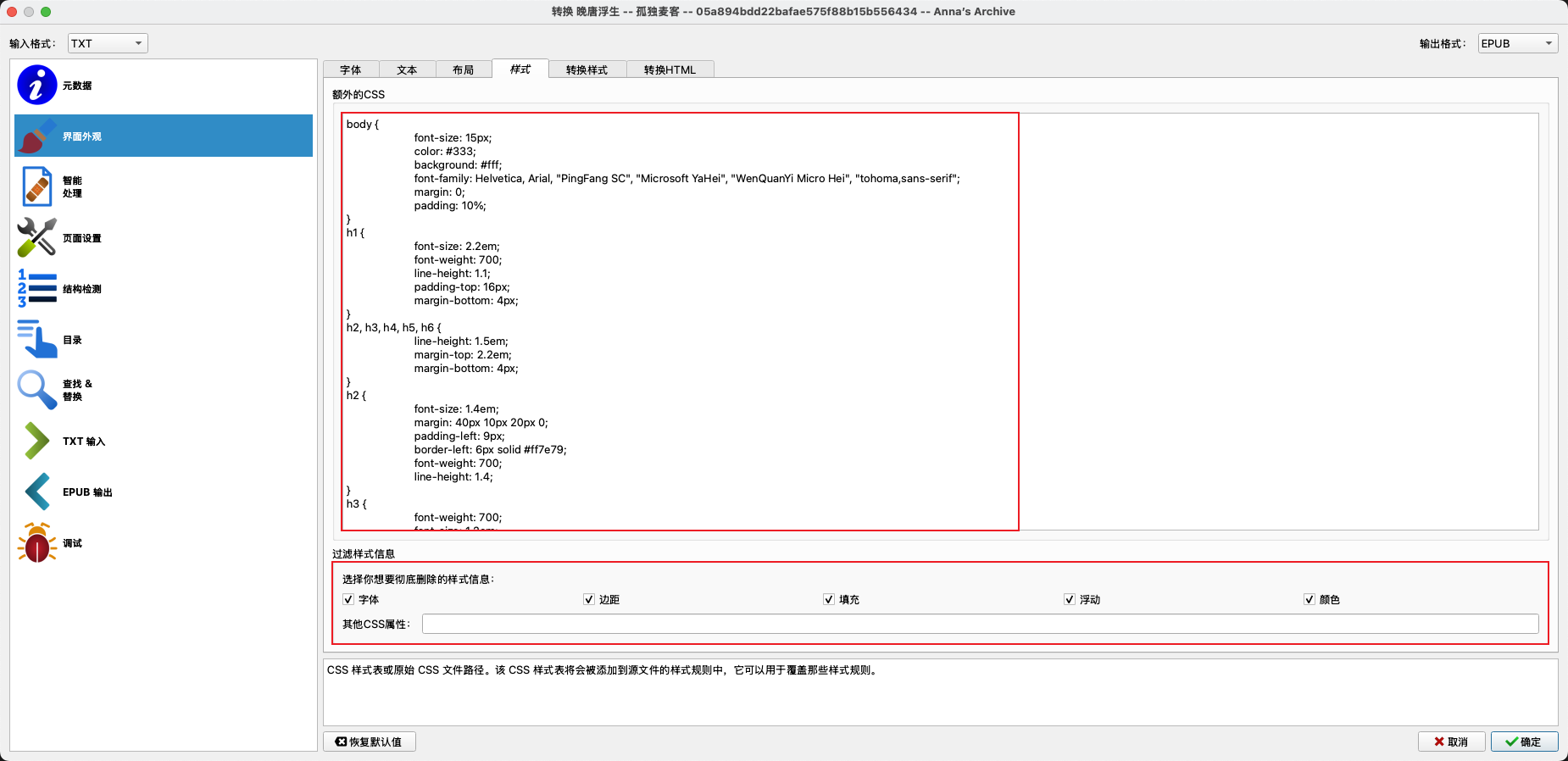
/* Sspai Web Theme A theme to [sspai](ssp.ai) default theme. Developed by Codegass(wchweichenhao@gmail.com) & Yves(yves@sspai.com) Download Cuto on the App Store and Google Play! */

body {
    font-size: 15px;
    color: #333;
    background: #fff;
    font-family: Helvetica, Arial, "PingFang SC", "Microsoft YaHei", "WenQuanYi Micro Hei", Tahoma, sans-serif;
    margin: 0;
    padding: 10%;
}
h1 {
    font-size: 2.2em;
    font-weight: 700;
    line-height: 1.1;
    padding-top: 16px;
    margin-bottom: 4px;
}
h2, h3, h4, h5, h6 {
    line-height: 1.5em;
    margin-top: 2.2em;
    margin-bottom: 4px;
}
h2 {
    font-size: 1.4em;
    margin: 40px 10px 20px 0;
    padding-left: 9px;
    border-left: 6px solid #ff7e79;
    font-weight: 700;
    line-height: 1.4;
}
h3 {
    font-weight: 700;
    font-size: 1.2em;
    line-height: 1.4;
    margin: 10px 0 5px;
    padding-top: 10px;
}
h4 {
    font-weight: 700;
    text-transform: uppercase;
    font-size: 1.1em;
    line-height: 1.4;
    margin: 10px 0 5px;
    padding-top: 10px;
}
h5, h6 {
    font-size: .9em;
}
h5 {
    font-weight: bold;
    text-transform: uppercase;
}
h6 {
    font-weight: normal;
    color: #AAA;
}
img {
    width: 100%;
    border-radius: 5px;
    display: block;
    margin-bottom: 15px;
    height: auto;
}
dl, ol, ul {
    margin-top: 12px;
    margin-bottom: 20px;
    padding-left: 5%;
    line-height: 1.8;
}
p {
    margin: 0 0 20px;
    padding: 0;
    line-height: 1.8;
}
a {
    color: #f22f27;
    text-decoration: none;
}
a:hover {
    color: #f55852;
    text-decoration: underline;
}
a:focus {
    outline-offset: -2px;
}
blockquote {
    font-size: 1em;
    font-style: normal;
    padding: 30px 38px;
    margin: 0 0 15px;
    position: relative;
    line-height: 1.8;
    text-indent: 0;
    border: none;
    color: #888;
}
blockquote:before {
    content: "“";
    left: 12px;
    top: 0;
    color: #E0E0E0;
    font-size: 4em;
    font-family: Arial, serif;
    line-height: 1em;
    font-weight: 700;
    position: absolute;
}
blockquote:after {
    content: "”";
    right: 12px;
    bottom: -31px;
    color: #E0E0E0;
    font-size: 4em;
    font-family: Arial, serif;
    line-height: 1em;
    font-weight: 700;
    position: absolute;
}
strong, dfn {
    font-weight: 700;
}
em, dfn {
    font-style: italic;
    font-weight: 400;
}
del {
    text-decoration: line-through;
}
pre {
    margin: 0 0 10px;
    font-size: 13px;
    line-height: 1.42857;
    word-break: break-all;
    word-wrap: break-word;
    border-radius: 4px;
    white-space: pre-wrap;
    display: block;
    background: #f8f8f8;
    padding: 10px 20px;
    border: none;
    margin-bottom: 25px;
    color: #666;
    font-family: Courier, sans-serif;
}
code {
    color: #c7254e;
    background-color: #f9f2f4;
    border-radius: 4px;
    font-family: Menlo, Monaco, Consolas, "Courier New", monospace;
    padding: 2px 4px;
    font-size: 90%;
}
p>code {
    color: #c7264e;
    background-color: #f9f2f4;
    font-size: .95em;
    border-radius: 3px;
}
figure {
    margin: 1em 0;
}
figcaption {
    font-size: 0.75em;
    padding: 0.5em 2em;
    margin-bottom: 2em;
}
figure img {
    margin-bottom: 0px;
}
hr {
    margin-top: 20px;
    margin-bottom: 20px;
    border: 0;
    border-top: 1px solid #eee;
}
ol p, ul p {
    margin-bottom: 0px;
}
li {
    margin-bottom: 0.75em;
    margin-top: 0.75em;
}
ol#footnotes {
    font-size: 0.95em;
    padding-top: 1em;
    margin-top: 1em;
    margin-left: 0;
    border-top: 1px solid #eaeaea;
    counter-reset: footer-counter;
    list-style: none;
    color: #555;
    padding-left: 5%;
    margin: 20px 0;
}
ol#footnotes li {
    margin-bottom: 10px;
    margin-left: 16px;
    font-weight: 400;
    line-height: 2;
    list-style-type: none;
}
ol#footnotes li:before {
    content: counter(footer-counter) ". ";
    counter-increment: footer-counter;
    font-weight: 800;
    font-size: .95em;
}
@keyframes highfade {
    0% {
        background-color: none;
    }
    20% {
        background-color: yellow;
    }
    100% {
        background-color: none;
    }
}
a:target, ol#footnotes li:target, sup a:target {
    animation-name: highfade;
    animation-duration: 2s;
    animation-iteration-count: 1;
    animation-timing-function: ease-in-out;
}
a:target {
    border: 0;
    outline: 0;
}

1
//*[re:test(., "^\s*[第卷][0123456789一二三四五六七八九十零〇百千两]*[章回幕部节集卷].*", "i")]

编辑元数据

1
2
3
4
5
6
<div style="line-height: 1.4; margin: 0; padding: 0;">
  这是第一行简介内容<br>
  这是第二行简介内容<br>
  这是第三行简介内容<br>
  最后一行简介内容
</div>

Docker部署Calibre Web

 1
 2
 3
 4
 5
 6
 7
 8
 9
10
/data/calibre/
├── docker-compose.yml    # 配置文件
├── config/               # Calibre-Web配置目录
│   ├── app.db           # 应用数据库
│   ├── calibre-web.log  # 日志文件
│   ├── config.json      # 配置文件
│   └── metadata.db      # 数据库文件,这个文件必须存在
├── books/               # 图书库目录
│   └── [作者名]/[书名]    # 图书文件
└── upload/              # 上传目录

1
2
# 下载初始数据库文件
wget https://raw.githubusercontent.com/janeczku/calibre-web/master/library/metadata.db -O config/metadata.db

 1
 2
 3
 4
 5
 6
 7
 8
 9
10
11
12
13
14
15
16
17
services:
  calibre-web:
    image: lscr.io/linuxserver/calibre-web:latest
    container_name: calibre-web
    environment:
      - PUID=1000
      - PGID=1000
      - TZ=Asia/Shanghai
      - DOCKER_MODS=linuxserver/mods:universal-calibre # 启用Calibre工具集
      - OAUTHLIB_RELAX_TOKEN_SCOPE=1 # 解决部分OAuth登录问题
    volumes:
      - ./config:/config	# 配置文件目录
      - ./books:/books		# 图书库目录,存放所有图书和数据库
      - ./upload:/upload	# 上传目录,用于本地Calibre同步上传
    ports:
      - 8083:8083
    restart: unless-stopped

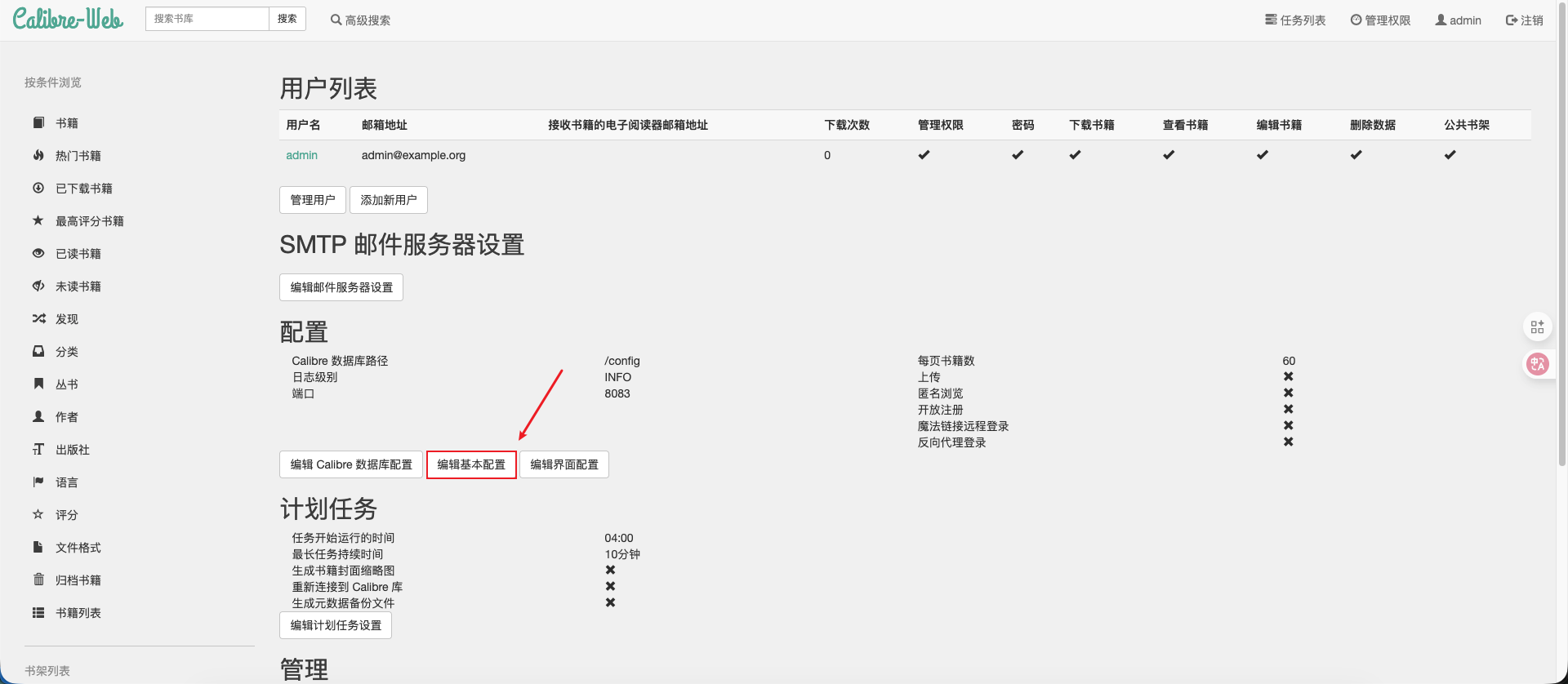
账号:admin

密码:admin123


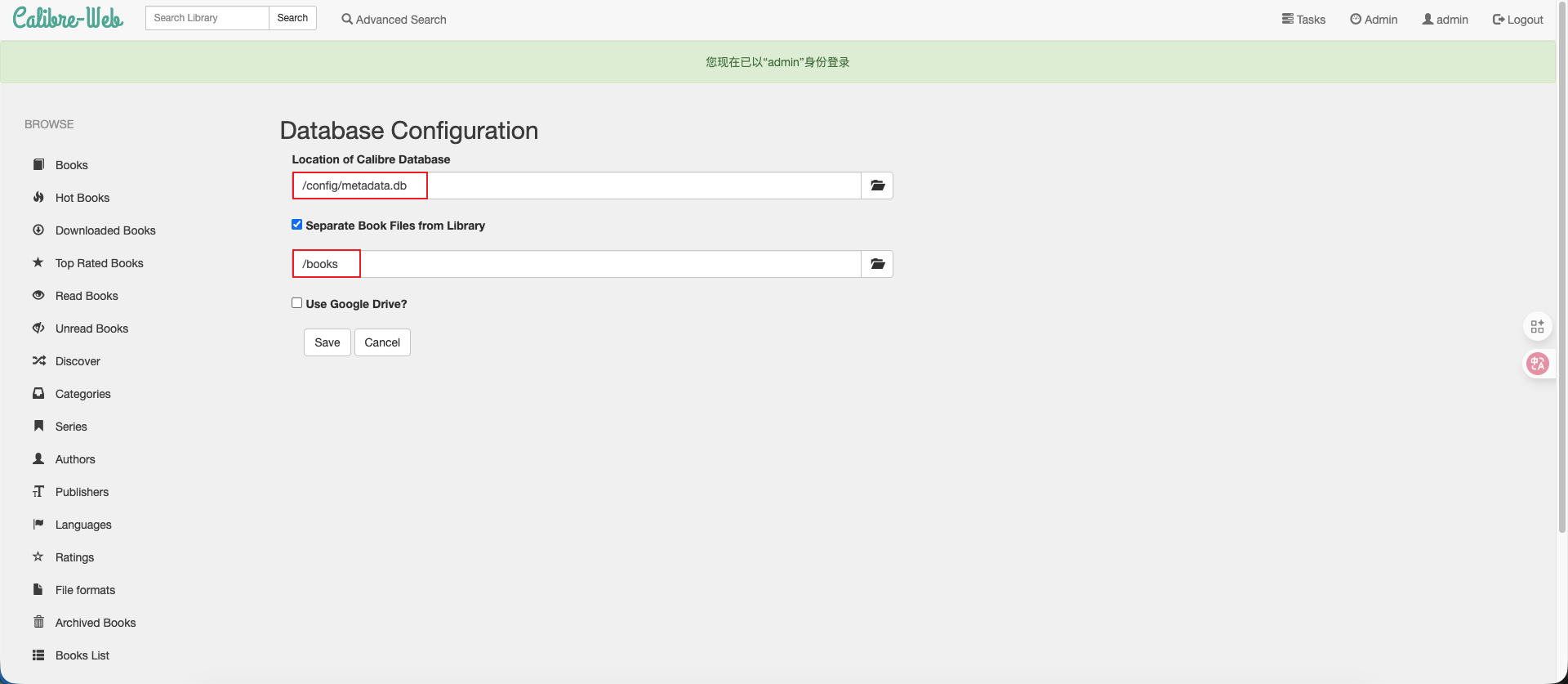
/images/guides/管理和阅读书籍/11.png
(图11)
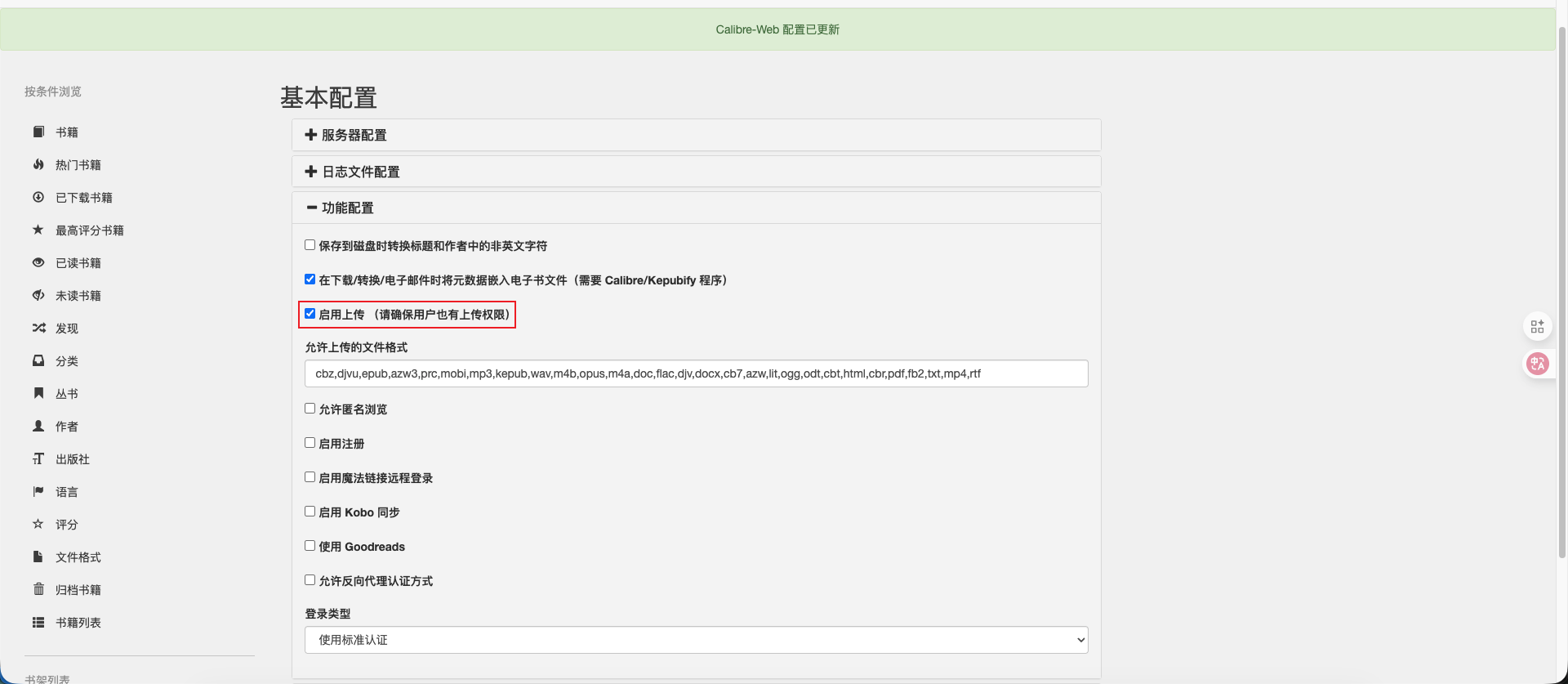
/images/guides/管理和阅读书籍/12.png
(图12)
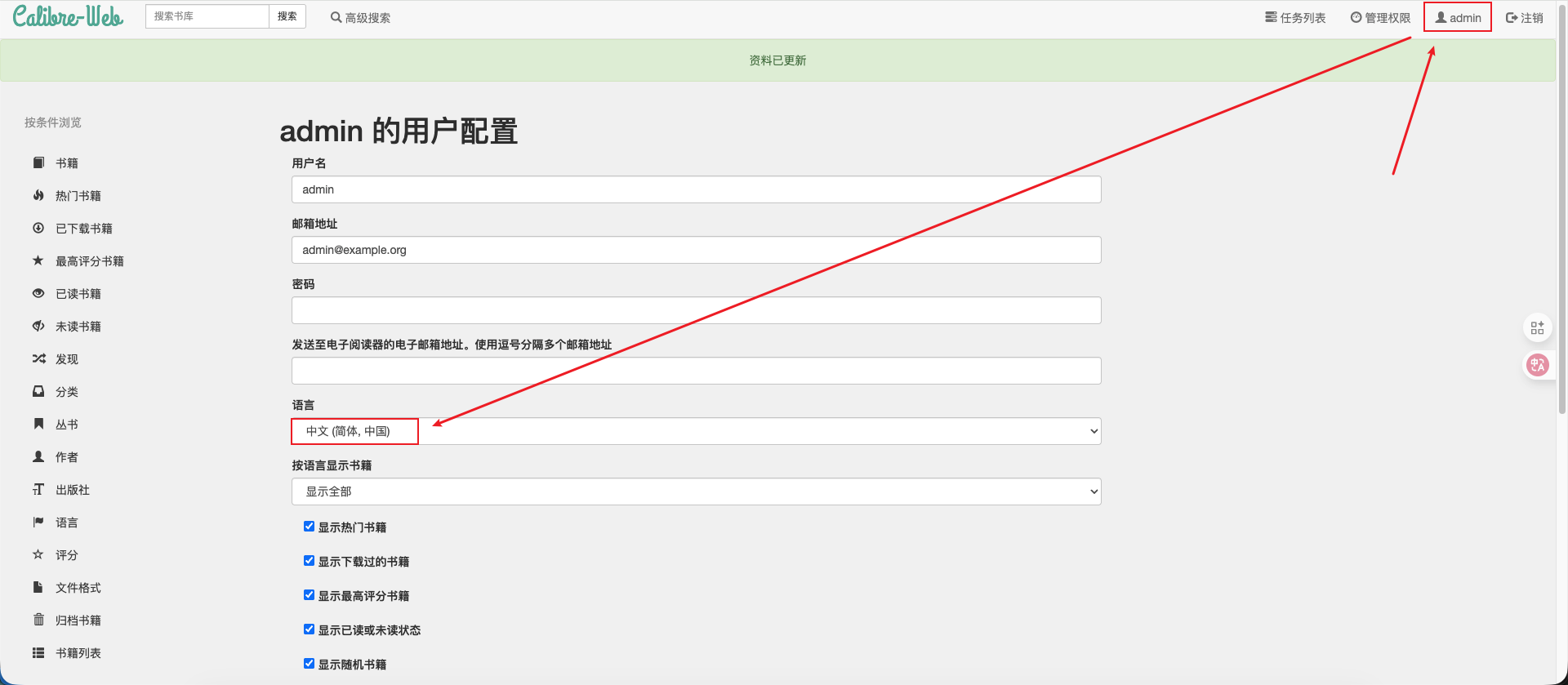
/images/guides/管理和阅读书籍/13.png
(图13)
/images/guides/管理和阅读书籍/14.png
(图14)

Docker部署BookLore

1
2
3
4
5
6
7
8
mkdir -p ./booklore/config/mariadb
mkdir -p ./booklore/data
mkdir -p ./booklore/books
mkdir -p ./booklore/bookdrop

# 导航到您的 Booklore 目录并创建配置文件:
cd ~/booklore
nano docker-compose.yml

目录 目的 重要提示
config/mariadb 数据库配置和数据文件 切勿删除 - 包含所有元数据
data 应用程序数据、缓存、日志 存储设置和临时处理文件
books 主要图书馆存储空间 在此添加书籍或通过 Bookdrop 导
bookdrop 自动导入文件夹 将文件拖放至此处,即可进行免提导入

备份重要目录

经常备份 config/mariadbbooks 防止数据丢失。


专业提示

在生产环境中,请使用绝对路径来存储卷。相对路径可能会导致容器重启出现问题。

使用Docker数据库

 1
 2
 3
 4
 5
 6
 7
 8
 9
10
11
12
13
14
15
16
17
18
19
20
21
22
23
24
25
26
27
28
29
30
31
32
33
34
35
36
37
38
39
40
41
42
services:
  booklore:
    image: booklore/booklore-app:latest
    container_name: booklore
    environment:
      - PUID=501
      - PGID=20
      - TZ=Asia/Shanghai
      - DATABASE_URL=jdbc:mariadb://mariadb:3306/booklore
      - DATABASE_USERNAME=booklore
      - DATABASE_PASSWORD=your_secure_password
      - SWAGGER_ENABLED=false
    depends_on:
      mariadb:
        condition: service_healthy
    ports:
      - "6060:6060"
    volumes:
      - /your/local/path/to/booklore/data:/app/data
      - /your/local/path/to/booklore/books:/books
      - /your/local/path/to/booklore/bookdrop:/bookdrop
    restart: unless-stopped

  mariadb:
    image: lscr.io/linuxserver/mariadb:11.4.5
    container_name: mariadb
    environment:
      - PUID=501
      - PGID=20
      - TZ=Asia/Shanghai
      - MYSQL_ROOT_PASSWORD=super_secure_password
      - MYSQL_DATABASE=booklore
      - MYSQL_USER=booklore
      - MYSQL_PASSWORD=your_secure_password
    volumes:
      - /your/local/path/to/mariadb/config:/config
    restart: unless-stopped
    healthcheck:
      test: ["CMD", "mariadb-admin", "ping", "-h", "localhost"]
      interval: 5s
      timeout: 5s
      retries: 10

环境变量

PUID & PGID(用户 ID 与组 ID):

  • 需将其设置为与你的系统用户 ID 一致,以确保文件权限正常。
  • 可通过以下命令查看你的 ID:id -u(查看 PUID)和 id -g(查看 PGID)。

时区(TZ):

  • 设置为你的本地时区(例如:America/New_York 纽约、Europe/London 伦敦)。
  • 确保时间戳和定时任务的准确性。
  • 查看可用时区的命令:timedatectl list-timezones

DATABASE_PASSWORD(数据库密码):

  • bookloremariadb 两个服务中必须完全相同。
  • 使用强密码,且该密码需唯一(不与其他服务复用)。
  • 避免使用可能需要转义的特殊字符(如 $& 等)。

MYSQL_ROOT_PASSWORD(MySQL 根密码):

  • DATABASE_PASSWORD 需区分开(不可相同)。
  • 用于数据库管理操作(如创建用户、修改配置等)。
  • 务必将此密码设置得极其安全。

SWAGGER_ENABLED(Swagger 功能开关):

  • 生产环境中需设为 false,以保障安全性(避免 API 文档暴露)。
  • 开发阶段可设为 true,用于查看和测试 API 文档。

卷路径

重要提示:

请将 /your/local/path/to/… 替换为第一步中你实际的目录路径。


Linux/macOS 系统示例:

1
2
3
4
volumes:
  - /home/username/booklore/data:/app/data
  - /home/username/booklore/books:/books
  - /home/username/booklore/bookdrop:/bookdrop

Windows 系统(WSL2 环境)示例:

1
2
3
4
volumes:
  - /mnt/c/Users/YourName/booklore/data:/app/data
  - /mnt/c/Users/YourName/booklore/books:/books
  - /mnt/c/Users/YourName/booklore/bookdrop:/bookdrop

镜像版本

最新标签(默认值):

1
image: booklore/booklore-app:latest

特定版本(生产环境推荐):

1
image: booklore/booklore-app:v1.2.3

最佳实践

生产环境中应固定镜像的具体版本,以避免意外更新(如自动拉取的新版本包含未兼容变更)。

使用本地数据库

brew安装mariadb

步骤 1:确保本地 MariaDB 已安装并运行

通过 brew 安装并启动 MariaDB(若已安装可跳过安装步骤):

1
2
3
4
5
# 安装 MariaDB
brew install mariadb

# 启动 MariaDB 服务
brew services start mariadb

初始化数据库

 1
 2
 3
 4
 5
 6
 7
 8
 9
10
11
12
13
14
15
16
17
18
19
20
21
22
23
24
25
26
27
28
29
30
# 执行 MariaDB 安全安装脚本
sudo mysql_secure_installation

# [步骤1] 提示输入当前 root 密码(新安装时直接回车)
Enter current password for root (enter for none): # 直接回车(新安装尚未设置密码)

# [步骤2] 是否切换到 Unix socket 认证?
# 选择 n 保留密码验证(允许远程连接和传统登录方式)
Switch to unix_socket authentication [Y/n] # 输入 n 并回车

# [步骤3] 是否更改 root 密码?(强烈建议设置强密码)
Change the root password? [Y/n] # 输入 y 并回车
# 需要重复输入确认新密码

# [步骤4] 是否移除匿名用户?(强烈建议移除以增强安全)
Remove anonymous users? [Y/n] # 输入 y 并回车
# 移除默认创建的匿名账户,防止无凭证访问

# [步骤5] 是否禁止 root 远程登录?(生产环境必选)
Disallow root login remotely? [Y/n] # 输入 y 并回车
# 仅允许 root 从本地登录,大幅降低被暴力破解风险

# [步骤6] 是否移除测试数据库?(建议移除)
Remove test database and access to it? [Y/n] # 输入 y 并回车
# 删除默认的 test 数据库,减少潜在攻击面

# [步骤7] 是否立即重载权限表?(必须选择)
Reload privilege tables now? [Y/n] # 输入 y 并回车
# 使所有安全设置立即生效(无需重启服务)
# 成功后会显示 "All done!" 提示

 1
 2
 3
 4
 5
 6
 7
 8
 9
10
11
12
13
14
15
16
17
18
19
20
21
22
services:
  booklore:
    image: booklore/booklore-app:latest
    container_name: booklore
    environment:
      - PUID=501
      - PGID=20
      - TZ=Asia/Shanghai
      # 使用 host.docker.internal 指向宿主机(macOS)
      - DATABASE_URL=jdbc:mariadb://host.docker.internal:3306/booklore
      # 使用您本地的账号
      - DATABASE_USERNAME=xxx
      - DATABASE_PASSWORD=xxx
      # Disable Swagger UI in production
      - SWAGGER_ENABLED=false
    ports:
      - "6060:6060"
    volumes:
      - /your/local/path/to/booklore/data:/app/data
      - /your/local/path/to/booklore/books:/books
      - /your/local/path/to/booklore/bookdrop:/bookdrop
    restart: unless-stopped

启动

在包含 docker-compose.yml 的目录执行 docker compose up -d

容器启动后,打开您的网页浏览器并导航到:http://127.0.0.1:6060/setup


0%